Appearance
Audit log
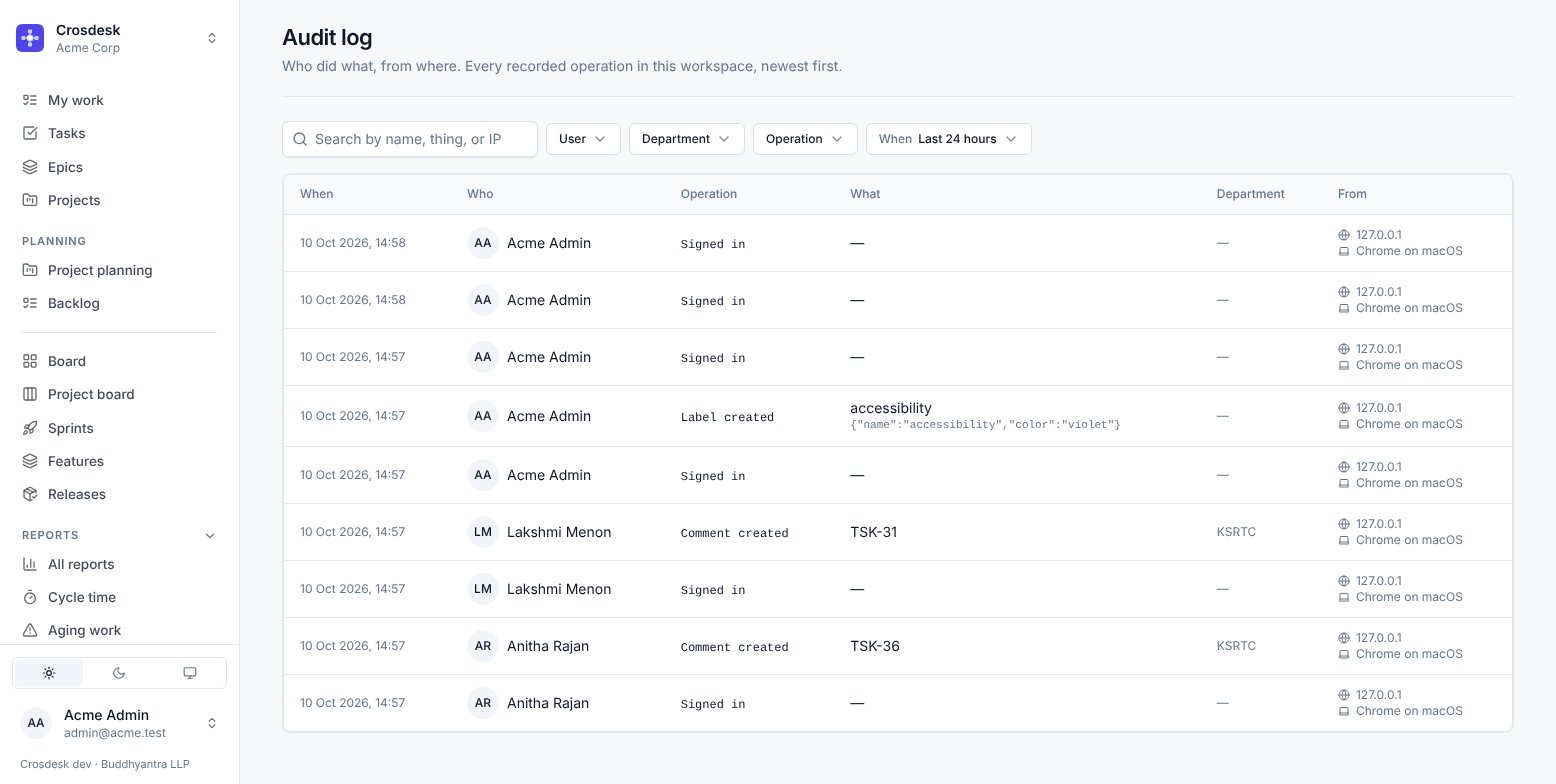
Who did what, from where. Every recorded operation in this workspace, newest first.
Administrators only.
What is in it
Each entry carries when, who, which operation, what it was done to, the department where that applies, and where from — the IP address and the browser.
The what column holds the thing's number and name as they were at the time (REL-13 1.4.0), so an entry stays readable even after the thing is renamed or deleted.
The table shows a summary of each entry, with long values cut short. Choose a row — or move to it and press Enter — to see everything recorded about it: the full person, operation, thing, address and device, each changed field's value before and after, and any other detail as it was written.
What is recorded
Sign-ins, and the operations that change something consequential:
- Projects — created, updated, deleted, verified
- Tasks — created, updated, deleted
- Sprints — created, updated, ended
- Features — created, updated, started, deleted; steps approved and changes requested; issues converted to tasks
- Releases — created, updated, deleted, released and unreleased
- Pull requests — linked and unlinked
- Users, departments, groups and labels — administrative changes
- Attachments — uploaded and deleted
- Documents — created, renamed or moved, versions saved, released and archived, editors and owner changed, drafts discarded, archived and unarchived, linked to work and unlinked; comments added, edited and deleted, threads resolved and reopened. Never the document's text or a comment's
- Holidays and the work schedule
Both directions are recorded where an action can be undone. Pulling a release back is logged as well as shipping it, because that is exactly the event somebody will later want to find.
Finding something
Filter by user, department, operation, and a time window — the last 24 hours by default. The window is fixed when you open the page or change a filter; Refresh brings in what has happened since. The search box matches the name of the thing acted on, so searching REL-13 finds everything that happened to that release.
What it is not
It is not a change log of field values — it records that a task was updated, not that the estimate went from 5 to 8. For that, open the thing itself: tasks and projects have their own History tab showing field-level changes.
Use the audit log to answer who and when. Use an item's History to answer what changed.