Appearance
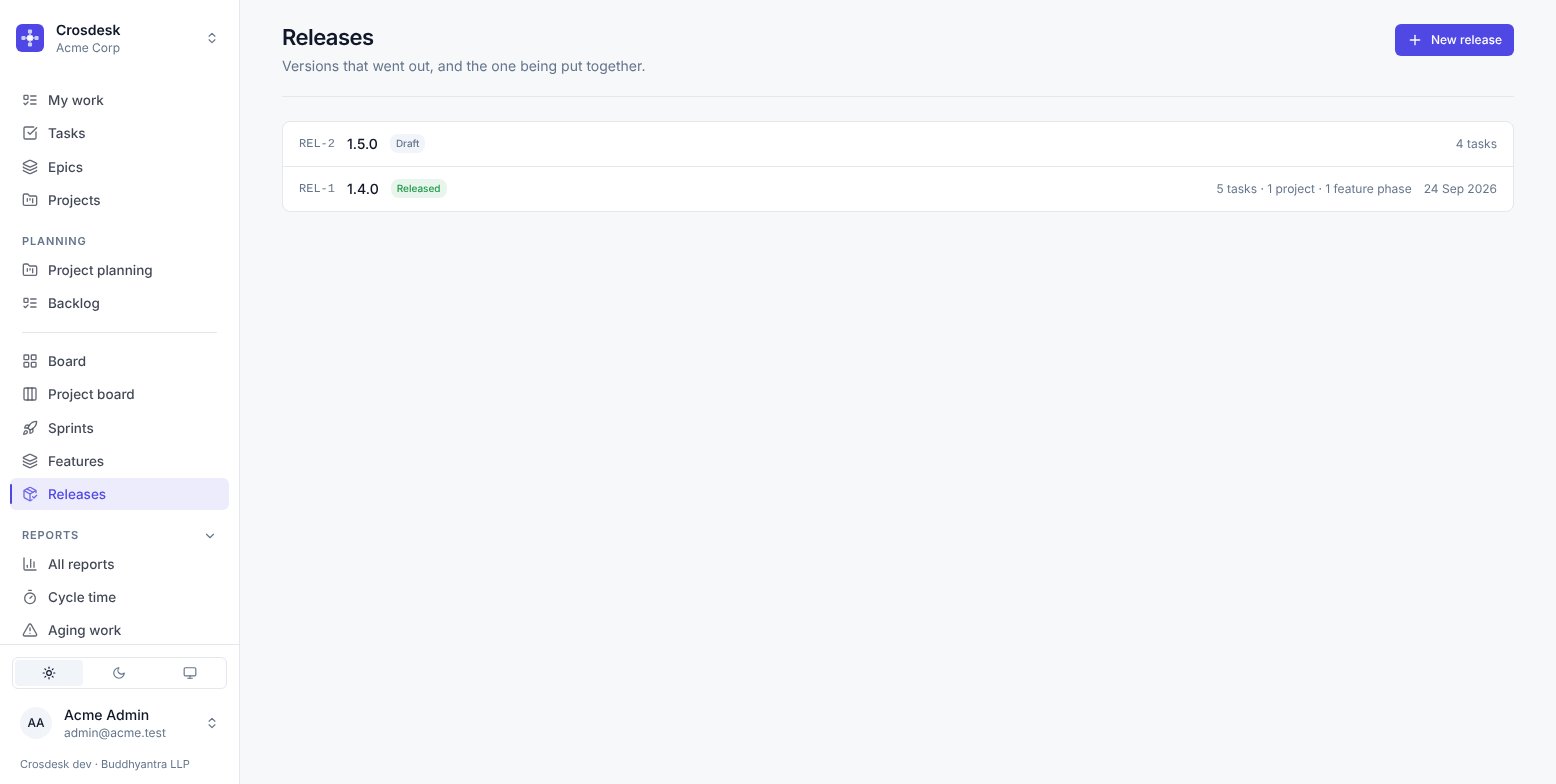
Releases
Versions that went out, and the one being put together.
Videos
What a release is
A version number, an optional name, an aim, a due date, a description, and the work it carries. The aim is one sentence on what the version is for — the list shows it under the version, and it is what the contents get checked against. The due date is the day it is meant to go out; the list shows it until the release ships, in red once it has passed. It answers "what went out in 1.4.0" months later, and "what is planned for the next release" today.
The version is free text. Teams number releases 1.4.0, 2026.10.1, sprint-42 and Tuesday, and a rule that admits only one of those is a rule half of them would work around. Versions are not unique either, because re-cutting 1.4.0 after pulling one back is a real thing.
Assembling one
New release, then Add work. The picker always works on one department — the release's departments if it has any, otherwise yours — starting with the first. Narrow it further with Status (applies to tasks) and Project, which lists only the projects that department's work sits on. It shows:
- Projects, each with the unreleased tasks on its canvas underneath. Tick the project to add the whole of it, or tick single tasks to send them out ahead of it.
- Tasks not on a project, with Offered to releases enabled, in any status.
- Feature phases in any status, including phases whose steps have not started. Hidden while a single project is chosen, since a phase belongs to a feature rather than a project.
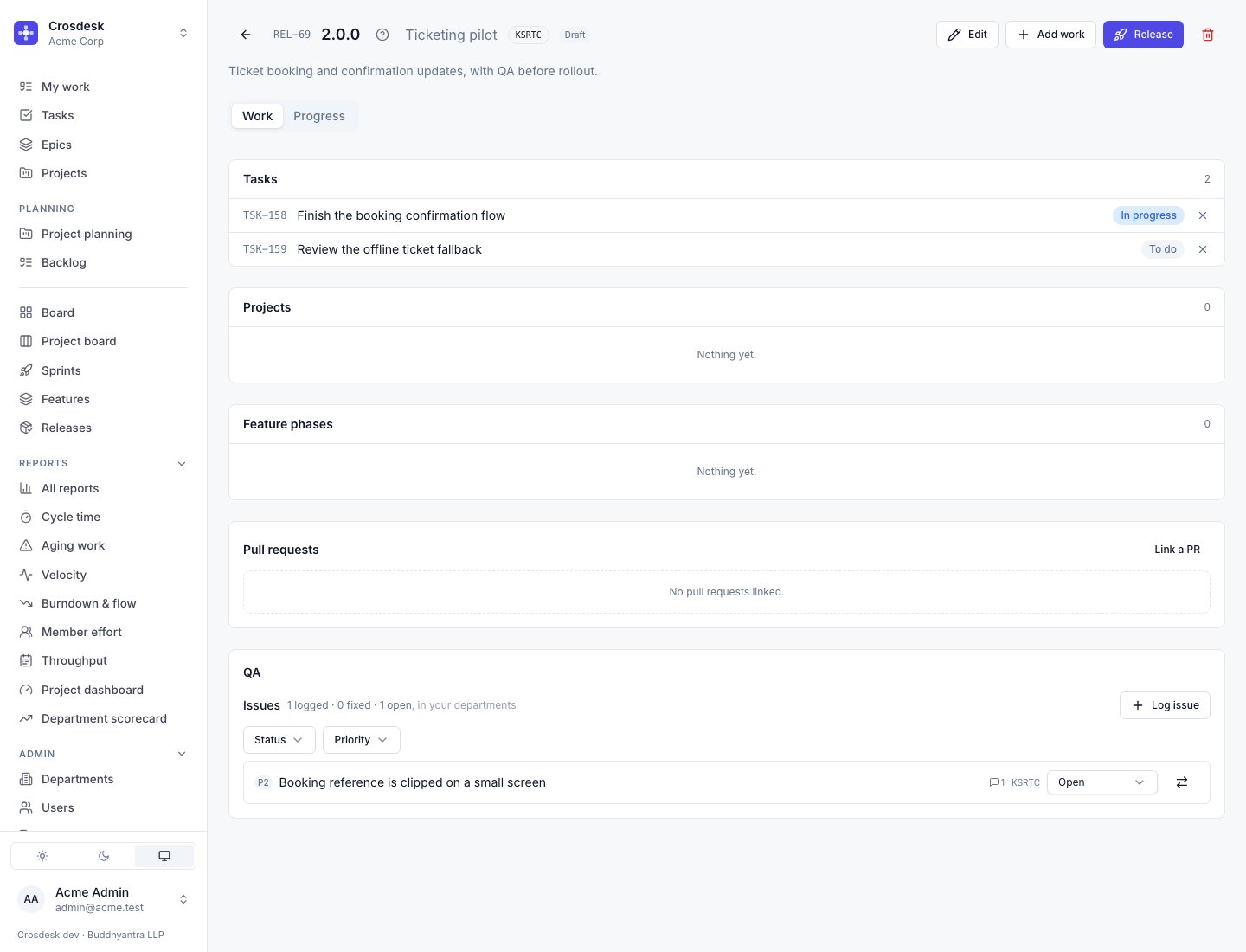
A project ships with its tasks — those still to go. Adding a project releases every task on its canvas that no release carries yet; they are listed under the project on the release, not again under Tasks. A task that came with its project cannot be taken out of the release on its own. Take the project out and those tasks go with it.
A task on a project can go out early. Tick it on its own and it ships in this release; when the project ships later, it takes the rest and leaves this one where it is. The project dashboard's Released work lists which of its tasks went out in which release, and whether each went on its own or with the project.
Every feature phase ships. There is no switch to keep one out of releases.
It only offers what no release has carried yet. Work that already shipped is absent rather than greyed out — the second release of the month should not re-offer everything the first one shipped. A thing ships once, and "not yet released" is simply the absence of a row.
A task or project with Offered to releases turned off never appears here.
Due date check
A draft release with a due date opens with Due date check above its work: every unfinished task, project and feature phase, set against the due date, worst first. The top line says how many items may hold the release past its date, how many working days are left, and how many items are done.
Each item gets one verdict and the reason for it:
- Blocker — forecast to finish after the due date (and by how many working days), on hold, or blocked by unfinished work before it on its project. Once the due date has passed, everything still open is a blocker.
- At risk — forecast to finish on the due date or one or two working days before it, or running past its own estimate so nobody knows how much is left.
- Can't tell — not enough to forecast from, such as no estimate or no start date. The reason is named, so you know what to fill in.
- On track — forecast to finish with more than two working days to spare.
Under each item is what matters for its kind: for a task, who is assigned (or that nobody is); for a project, how many of its tasks are done and which are on hold or planned to end after the due date; for a feature phase, how many steps are approved and which step it is at.
The forecasts are the ones Progress shows, so the two always agree. Refresh recalculates. Without a due date the panel asks for one; a release that has gone out does not show it.
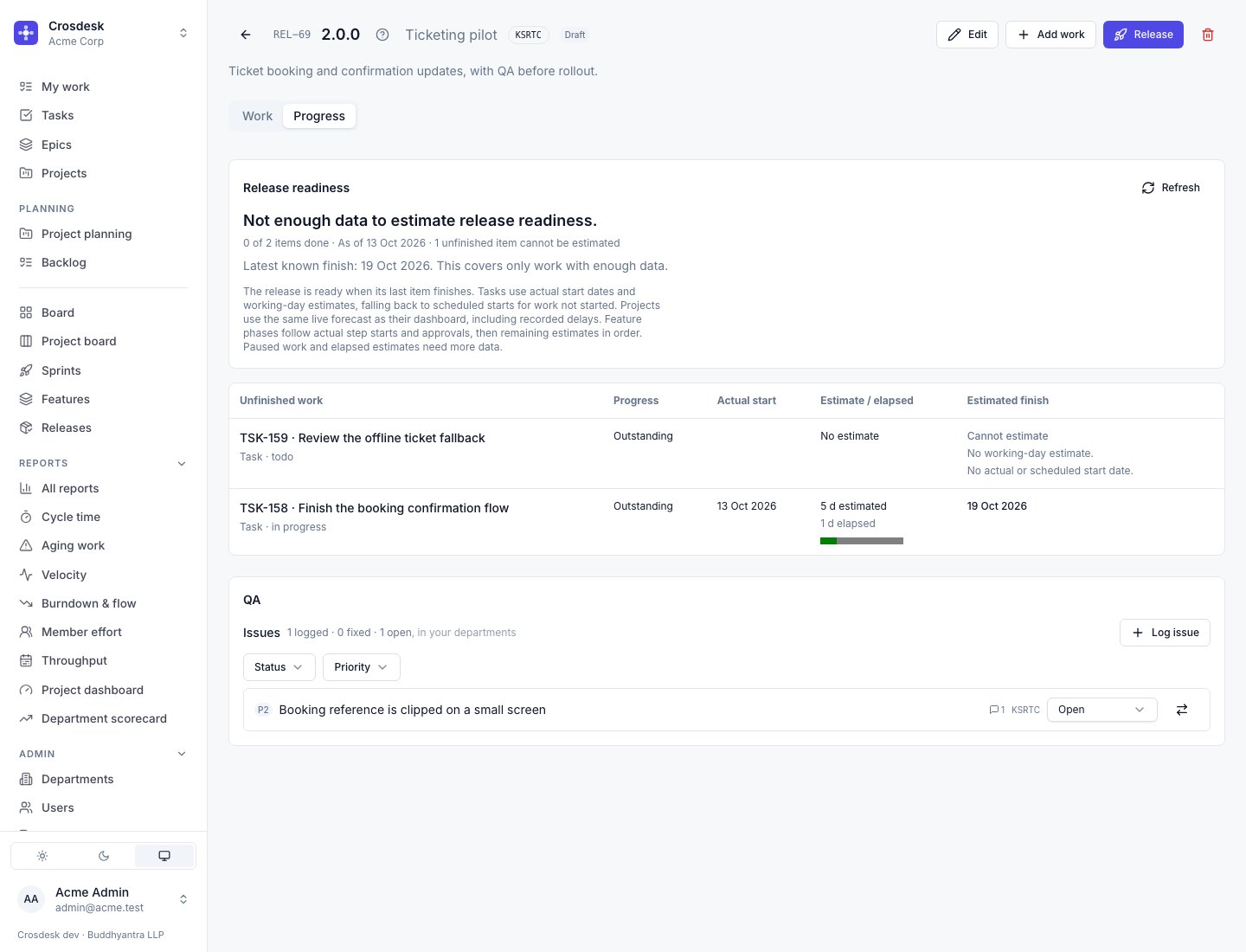
Open Progress to load the live readiness calculation. The release opens on Work, so forecasting does not slow down the contents page. Only unfinished work is listed in Progress.
Each row shows progress, actual start, working-day estimate, elapsed days and estimated finish:
- Tasks use the actual start and estimate. Work not started uses its scheduled start, no earlier than today. Held or blocked work needs a restart or unblock date. If the estimate has elapsed while work is still running, the remaining duration is unknown.
- Projects use the dashboard's live forecast, including recorded delays, rather than the original baseline. An unverified or incomplete schedule cannot give a finish for the project.
- Feature phases follow actual step starts and approvals, then estimate the remaining steps in order. A phase that has not started has no actual anchor to forecast from.
Estimated ready is when the last item finishes. If any item lacks enough data, the overall estimate is withheld and its row says why. Latest known finish then covers only the work that can be estimated; it is not the release's readiness date. Use Refresh to recalculate.
QA issues
Turn on QA Enabled when creating or editing a draft release to show QA at the bottom of its page. QA starts off; enabling it lets people in the release's departments log issues without needing project management. An unscoped release lets you choose any of your own departments.
Log an issue, then open it to add its description, priority, comments and files. You can change its status to Open, In progress, Ready for testing, Fixed or Won't fix. Ready for testing means the fix is in and waits for someone to confirm it; it still counts as open, so a release whose issues all sit there has not finished its QA. Issues and counts cover your departments; people in other departments do not see them. QA remains available after the release ships.
Convert to task creates a BUG in the issue's department, copying its title, description, priority and assignee. Files on the issue and its live comments are copied to new attachments and new stored files on the task. Deleting an original file does not remove the task's copy. The issue remains linked to the task and cannot be converted twice. Converting sets it to Won't fix (unless it was already Fixed), so it no longer holds QA open, and the task links back to it with From issue. Recordings linked to the issue are linked to the task as well.
Switching QA off keeps recorded issues. Enabling it again shows them. Deleting the release removes its QA issues and their conversations; converted tasks and their file copies remain.
Pull requests on a release
A release has its own code — the version bump, the changelog, the deploy. Link those here. The pull requests of the work it carries stay on their tasks and phases, where they already are.
Every pull request behind a release
Progress lists every pull request behind what the release ships, each once: the release's own, its tasks', its projects' and the tasks on those projects' canvases, and its feature phases', their stages' and the issues under those stages'. Each row names where it is linked from — TSK-12, PRJ-3, FTR-1 · Phase 2 · HLD — and those chips open that work.
Above the list, how many have merged out of how many, and a count for each status, which filters the list. Failing gates and work waiting on review come first; merged and closed last. CSV downloads the list. Work in a department you are not in contributes nothing, so a pull request reached only through it is not listed for you.
Editing
Edit changes the version, name, aim, due date and description. Clearing the name, aim or date removes it.
Shipping
Release marks it as gone out and stamps the date. After that it is frozen: no edits, no adding or removing work, no changing its pull requests.
Going out finishes the work. Every task the release carries — on its own or with a project — and every subtask under them is marked Done, finished on the day it went out. If any are not done yet, Release lists them and asks first. Work waiting on them on a project canvas is unblocked as if someone had finished them by hand, and a project whose last task this was closes itself. Projects and feature phases are not changed directly. Each task's history says when its release went out. Pull back does not reopen them: the release cannot know which were finished before it.
With QA on, a release whose QA issues are not all Fixed or Won't fix cannot be released. Pressing Release lists the open ones, with Review issues (takes you to the QA panel) or Move to won't fix and release (closes them all as won't fix and releases, in one go). As on the issue list, only issues in your departments count. Pull back is never held up.
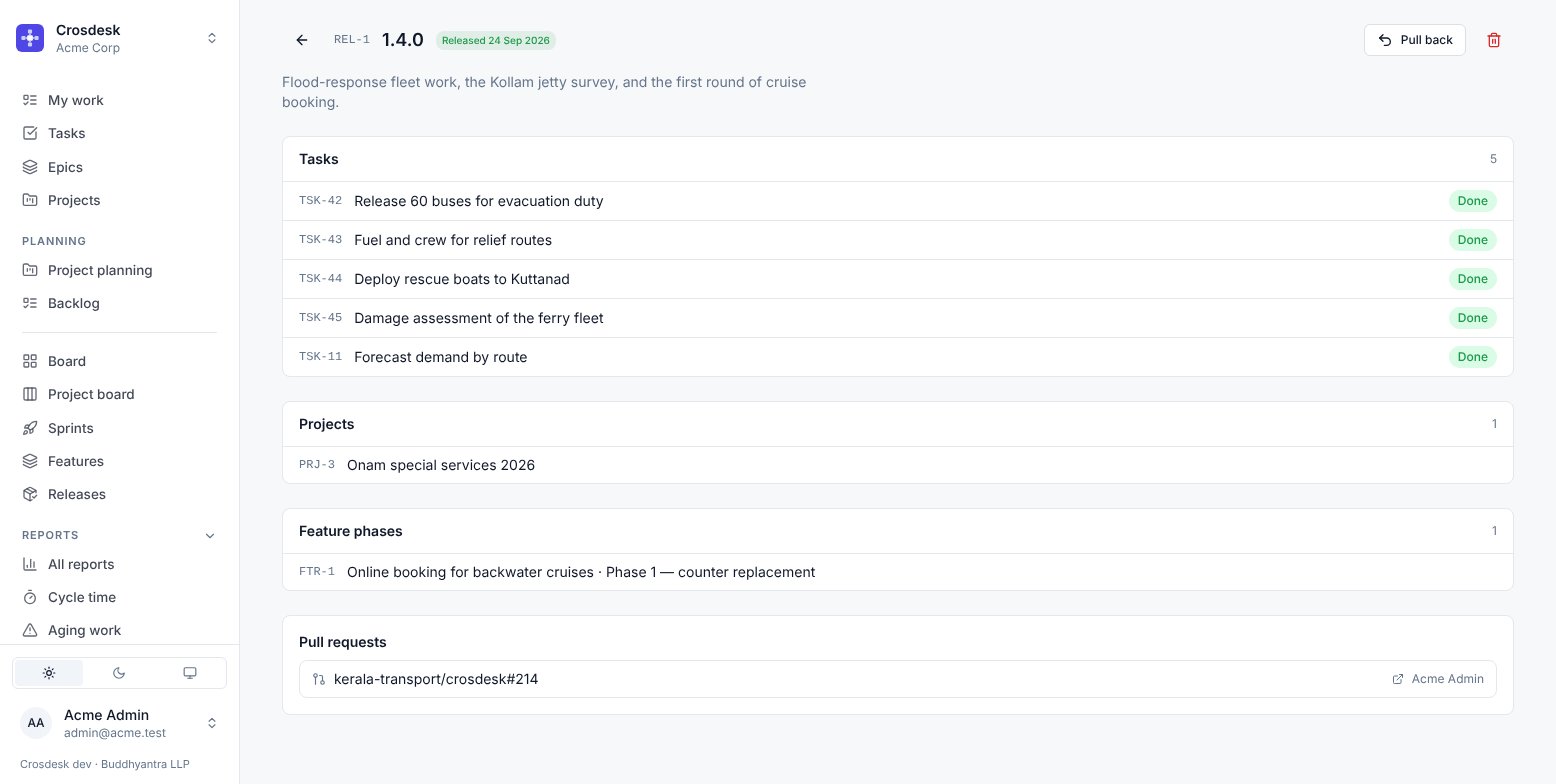
That is deliberate. A shipped version is a record other people have already quoted, and it should not change underneath them. Pull back returns it to draft if you genuinely need to correct it — and the audit log records both the shipping and the pulling, because pulling a version back is exactly the event somebody will later want to find.
Deleting a release
Asks first, and says what returns rather than what disappears: the tasks, projects and feature phases it carried go back to being unreleased, and will be offered to the next release. Only the release record itself is removed.
Permissions
Everyone can see releases. Creating, editing, adding work and shipping need project management.
Where else a release appears
A task that shipped shows its version on the task page and in lists. That is the quickest way to answer "did this go out, and in which version".
Use Assign to when you log or edit an issue. The list contains users in the issue’s selected department. Changing the department clears the selection; you can also leave the issue unassigned.