Appearance
Reports
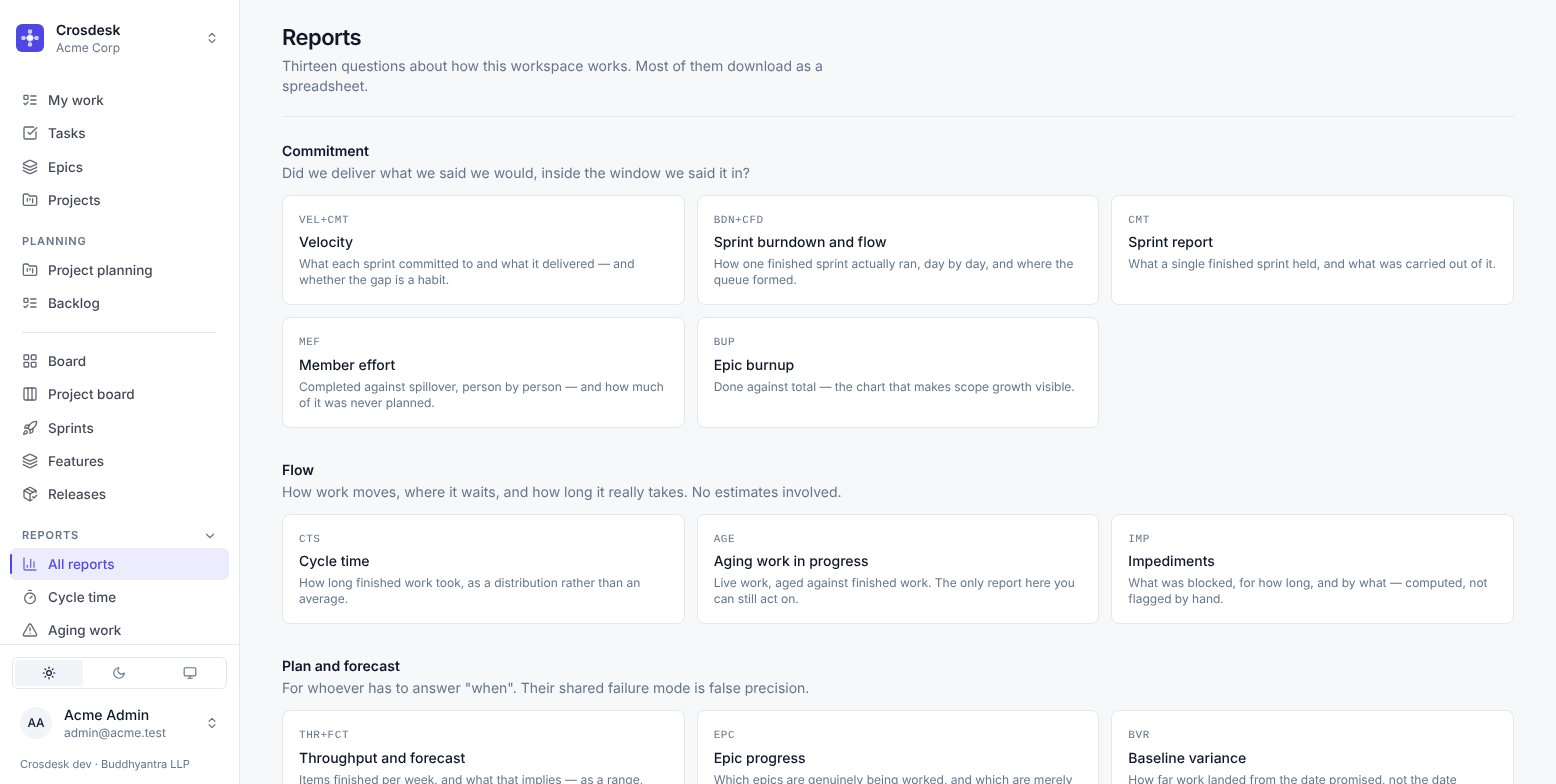
Thirteen questions about how this workspace works. Most download as a spreadsheet.
Most reports need the sprint management capability; Department scorecard needs project management. If the section is missing for you, that is why.
How they are grouped
The grouping is the most useful thing on the page, because the three groups fail in different ways and reading one as if it were another is the common mistake.
Commitment — did we deliver what we said we would?
| Report | Answers | Does not answer |
|---|---|---|
| Velocity | What each sprint committed to and what it delivered | How fast anyone works. It counts planned work only |
| Sprint burndown and flow | How one finished sprint ran, day by day, and where the queue formed | Anything about sprints still running |
| Sprint report | What a single finished sprint held, and what carried out of it | — |
| Member effort | Completed against spillover, person by person, split planned/unplanned | Who is good at their job. It is a record of a sprint |
| Epic burnup | Done against total, which makes scope growth visible | — |
Flow — how does work move?
No estimates involved, which is what makes this group useful when estimates are disputed.
| Report | Answers |
|---|---|
| Cycle time | How long finished work took, as a distribution rather than an average |
| Aging work in progress | Live work aged against finished work. The only report here you can still act on |
| Impediments | What was blocked, for how long and by what — computed, not flagged by hand |
Plan and forecast — when?
Their shared failure mode is false precision.
| Report | Answers |
|---|---|
| Throughput and forecast | Items finished per week, and what that implies — as a range, never a date |
| Epic progress | Which epics are genuinely being worked, and which are merely open |
| Baseline variance | How far work landed from the date promised, not the date currently planned |
| Department scorecard | One project, graded by the departments working it |
| Feature dashboard | One feature's phases against the baseline each one promised |
Member effort
The report most likely to be misread, so it is worth the detail.
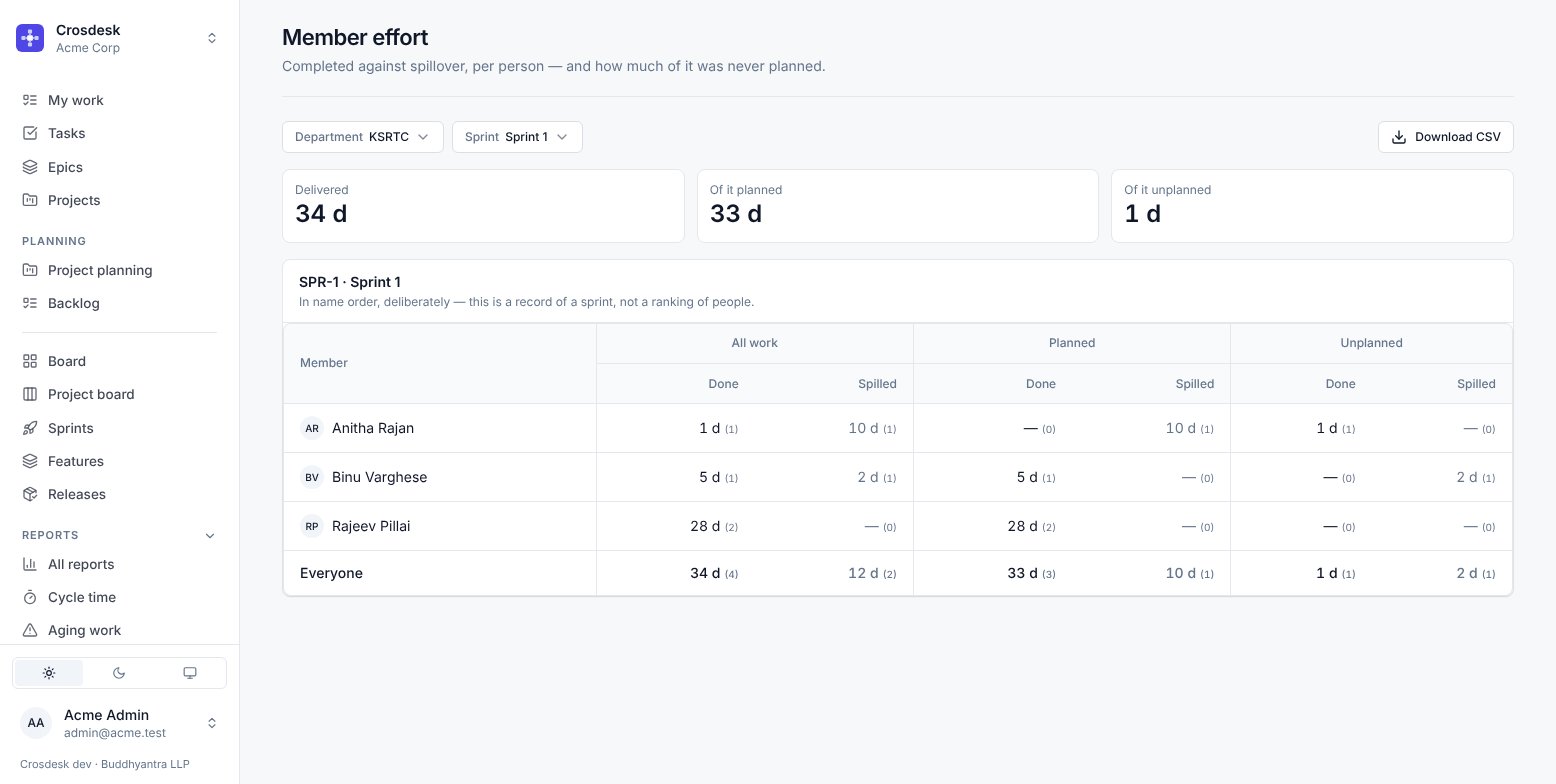
Each person gets six numbers: done and spilled, for all work, planned and unplanned. The planned and unplanned columns add up to the all-work column.
What it is for: a person whose planned delivery looks thin but whose unplanned column is full is not slow — they are absorbing the work nobody planned for. That is invisible in velocity, which counts planned work only, and it is the whole reason this report exists.
Rows are in name order, deliberately. It is a record of a sprint, not a ranking of people, and sorting by output would make it one.
Baseline variance
Compares where work landed against the dates the project originally promised at its first Verify — not against the dates currently showing. Re-planning a late project does not make the variance disappear, which is the only way the number is worth having.
Feature dashboard
Reports → Feature dashboard shows one running or finished feature, one phase at a time — the earliest phase that is not done unless you choose another (the last phase, once all are). Open to anyone who can see the feature. Drafts are not in the Feature picker, but a draft's own Dashboard link opens it — useful for its estimate history — and the picker then names it.
Headline — steps approved, work done, open issues, and three finish dates: promised (the baseline), planned (where the plan stands after every edit) and projected.
Baselines — each phase's, with who took it. A phase without one says so and, if you manage projects, offers Set baseline. See the baseline.
Promised, Planned and Actual — three charts of the steps on one shared axis, so the gap between them is the finding.
How the plan moved — every time a running phase's finish moved, with its cause (a start date, a re-estimated step) and its size in working days, and every baseline. Every change to a step's estimate is here too, in any feature status, with the estimate before and after — whether a person changed it or it grew to cover its tasks. A move that cannot be measured, such as a first baseline, shows a dash rather than 0 d.

One table per phase — each step's promised, planned and actual window; how late it started and finished against the promise; effort against its promised estimate; how many times it was sent back; its work and open issues.
By department, Sprints carrying this feature, releases, pull requests and meetings.
The projected finish is the later of two readings: the plan pushed out by what has overrun so far, and the work still left laid out from today. The second is what catches a phase that started late. Neither credits finishing early until the phase is done.
Issue counts are those in your departments, so two people can read different totals.
Downloads
Most reports download as CSV, with the same numbers the screen shows.